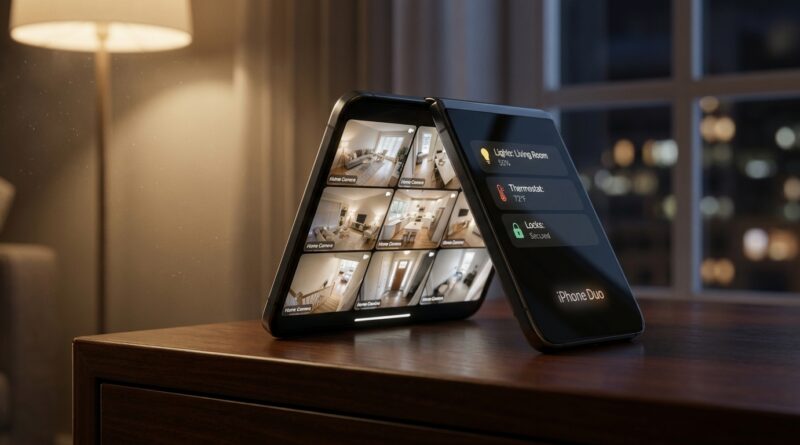
iPhone Duo ‘StandBy Smart‑Home Hack’: The Quiet Rushmore Leak That Turns Your Foldable Into A Live Camera Wall
If you are tired of foldable leaks that obsess over creases and camera bumps, you are not alone. Most of that stuff matters on launch day, then fades into the background. What actually changes your daily life is how a device fits into your home. That is why this iPhone Duo StandBy leak Home Camera Rushmore story is more interesting than it first sounds. The quiet detail is not the hardware. It is the software view Apple appears to be building around StandBy, with hints that the foldable layout can act like a compact home dashboard and live camera wall when parked on a desk, counter, or nightstand. For people already deep into HomeKit, or just trying to keep an eye on the front door, nursery, or backyard without buying another smart display, this could be the real reason to care about Duo. It turns a foldable from a pocket device into a part-time home hub.
⚡ In a Hurry? Key Takeaways
- The leak suggests iPhone Duo StandBy could show richer split layouts, including always-available Home controls and live camera views, not just a bedside clock.
- If you are considering Duo, start planning its “parking spots” now. Desk, kitchen counter, and nightstand are the three places where this feature could matter most.
- This could make HomeKit cameras, smart plugs, locks, and lights more useful, but only if Apple keeps privacy controls tight and allows simple glanceable access.
Why this leak matters more than another hinge rumor
Most leak cycles get stuck on the easy stuff. Thickness. Weight. Crease visibility. Under-screen camera quality. Fine. Useful, sure. But those details do not tell you whether a foldable will become part of your routine or end up as an expensive novelty.
StandBy is different because it answers a boring but important question. What does the phone do when you are not holding it?
On current iPhones, StandBy is nice, but limited. It is a good clock, photo frame, and widget screen when charging sideways. On a foldable, though, the shape changes the whole idea. A larger canvas can show more than one useful thing at once. That is where the Rushmore angle comes in. Instead of one camera feed, one widget, one glance, the leaked direction points to a mini wall of information.
The “Rushmore” part. A live camera wall you can actually use
The phrase “live camera wall” sounds more dramatic than it needs to be, so let’s make it plain. Think of your iPhone Duo half-open on a kitchen counter. One side could show the front door. Another could show the driveway. Another might hold a quick Home scene button, like “Good Night” or “All Lights Off.”
That is a lot more useful than a giant digital clock.
If the leak is right, Apple seems to be treating the Duo’s folded and partially opened states as new StandBy opportunities, not just stretched versions of the current iPhone screen. That matters because the best smart-home displays succeed on one thing. They let you glance, tap once, and move on.
Where iPhone Duo could fit in your home
1. The kitchen counter
This is probably the strongest case. The kitchen is command central in most homes. It is where packages arrive, kids run through, lights get switched on, and recipes fight for screen time.
A Duo in StandBy could act like a tiny home monitor while charging. Check the porch camera while making coffee. Open the garage for a family member. Kill the downstairs lights after everyone leaves. If Apple keeps the controls big and easy to hit, this could feel much more natural than pulling out your phone every time.
2. The desk
This is where Duo may quietly beat a regular phone. A foldable can sit in a more laptop-like pose, which makes always-on info more practical. You could keep a camera feed from the door on one panel and calendar or reminders on the other. That would make StandBy less decorative and more like a compact control center.
If you work from home, that is a real quality-of-life upgrade. You do not need a full smart display taking up space. You use the device you already own.
3. The nightstand
Yes, it can still be a clock. But the leak suggests it may be more than that. For some people, a nightstand Duo could become a quiet bedside dashboard. Think alarm controls, indoor temperature, a baby camera feed, or one-tap scenes for locking doors and shutting off downstairs lights.
This is where Apple needs to be careful, though. A phone that can show cameras at a glance should also make it very easy to blank the screen, hide sensitive views, or require Face ID for certain controls.
What HomeKit gear becomes more valuable if this leak is right
If you are deciding whether Duo is worth the jump, do not just compare chips and cameras. Compare ecosystem value.
HomeKit cameras
These are the biggest winner. A better StandBy layout makes existing HomeKit Secure Video cameras far more useful. If Duo can pin one or more feeds in a stable, glanceable way, your front porch cam suddenly gets promoted from “alert generator” to “daily dashboard tool.”
Smart locks and doorbells
This pairing makes a lot of sense. A live doorbell camera view plus a nearby unlock control could turn Duo into a very practical front-door station when left on a side table or counter.
Lights and scenes
Scenes may sound basic, but they are what make smart homes feel simple. If Duo StandBy puts “Movie,” “Good Night,” or “Leave Home” on a persistent screen, more people will actually use them.
Sensors
Temperature, motion, and contact sensors are boring on paper. On a passive home dashboard, they become useful. A quick glance that tells you the back door is still open or the nursery is warmer than usual can save you from small daily annoyances.
What to watch before you preorder
This is the part where a lot of buyers get burned by leaks. A promising concept is not the same as a polished feature. So before you trade in your current phone, watch for these details.
How many camera feeds can it show at once?
One feed is nice. Two or three is where the “camera wall” idea starts to matter. Apple may limit this for battery, heat, or privacy reasons.
Does StandBy work in multiple fold positions?
This is huge. A foldable that only behaves well in one exact charging pose is much less useful than one that adapts whether it is tented, half-open, or fully propped up.
Will it need MagSafe charging to unlock the best layouts?
Apple often ties convenience to accessory habits. If Duo’s best StandBy mode only shines on specific docks or orientations, that affects how much it will cost to set up properly around your home.
How aggressive are the privacy controls?
A live camera wall sounds great until guests, kids, or anyone walking by can see more than you want. Good privacy options are not a bonus here. They are important.
The practical playbook. How to plan for Duo now
You do not need to wait for launch day to think this through.
Pick your top two parking spots
Choose the two places where your phone spends the most time charging or resting. For most people, that is the desk and the nightstand, or the kitchen and the desk. If Duo lands there, StandBy has a real job. If not, the feature may be less important than it sounds.
Check your HomeKit weak spots
Ask yourself a simple question. If you had a screen always facing you, what would you want on it? Front door camera? Thermostat? A lock status? This tells you which smart-home gear becomes worth buying or upgrading.
Think in glances, not sessions
The best use for a home dashboard is not deep control. It is quick reassurance. Package arrived. Door locked. Kids home. Porch clear. If that kind of glance is useful in your life, this leak matters a lot more than a benchmark score.
Could this be a bigger upgrade than the camera?
Honestly, for many people, yes.
Phone cameras are already very good. Processors are already fast. But a phone that changes role when set down is still fresh. That is what makes this leak interesting. It suggests Apple may be trying to give the foldable a second identity. Not just “big iPhone,” but “small home display when idle.”
That is the kind of feature that sticks. Not because it is flashy, but because it saves tiny bits of effort all day long.
At a Glance: Comparison
| Feature/Aspect | Details | Verdict |
|---|---|---|
| StandBy on a regular iPhone | Useful for clocks, widgets, and basic glanceable info while charging sideways. | Good, but limited as a smart-home screen. |
| Leaked Duo StandBy approach | Hints at richer split views, better use of fold positions, and more practical Home camera layouts. | Potentially the most useful day-to-day Duo feature. |
| Best buyer takeaway | Judge Duo by where it will sit in your home, not just what it can do in your hand. | Smart move before any preorder or trade-in. |
Conclusion
This is why the iPhone Duo StandBy leak Home Camera Rushmore angle deserves more attention than the usual foldable gossip. It helps the community today because the most actionable new leak in the last 24 hours is not another spec sheet, it is how StandBy on iPhone Duo is quietly turning your foldable into a flexible home hub. Instead of waiting for reviewers to stumble across these views after launch, you can start thinking now about where Duo would live in your house, which HomeKit gear would become more useful, and whether this hidden software trick matters more to you than yet another camera bump or chipset update. If Apple gets this right, Duo will not just be a phone you fold. It will be the screen you leave open on purpose.